To receive updates for the Pro plugin, activate your license key. You activate it once for each website.
Plugin Pro only
Where PSM Plugins → Request a Quote → License
Activate
Find your license key in your PSM Plugins purchase.
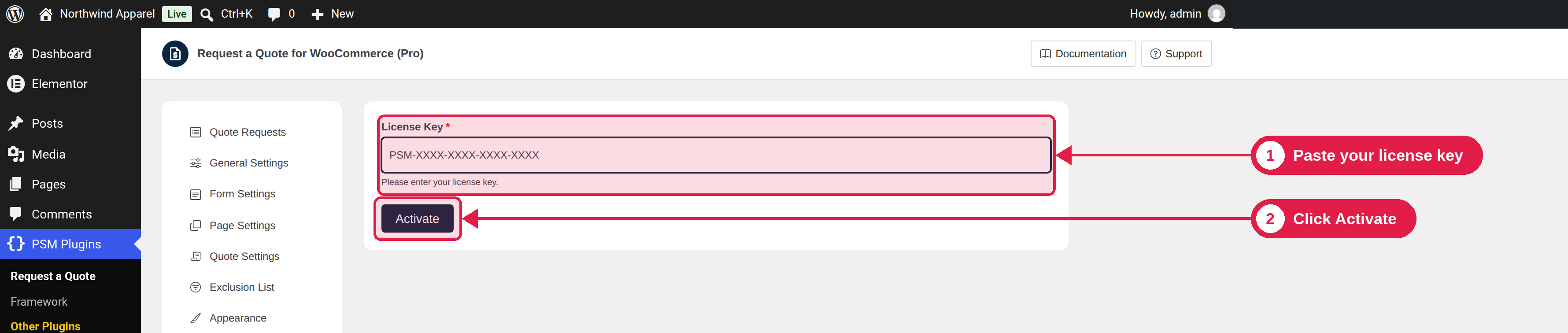
Go to PSM Plugins → Request a Quote → License.
Paste the key in the License Key box.
Click Activate.
You see “License activated successfully!” and the date your license is valid until. A lifetime license shows “Your license key is valid for a lifetime”.
Refresh or deactivate
Refresh: checks your license again and updates the expiry date. Use it after you renew.
Deactivate: removes the license from this website. Do this before you move to a new domain, so you can use the key again.
If activation fails
Problem
What to do
The key is not accepted
Copy the key again, without spaces at the start or the end.
No activations left
The key is used on the maximum number of sites. Deactivate it on another site, or buy more activations.
The license has expired
Renew your license, then click Refresh.
If you still need help, use the Support button at the top of the settings page.