
Reminder emails help you get answers. They remind the customer about a quote that has no answer yet, or that is about to expire.
Plugin Pro only
Where WooCommerce → Settings → Emails
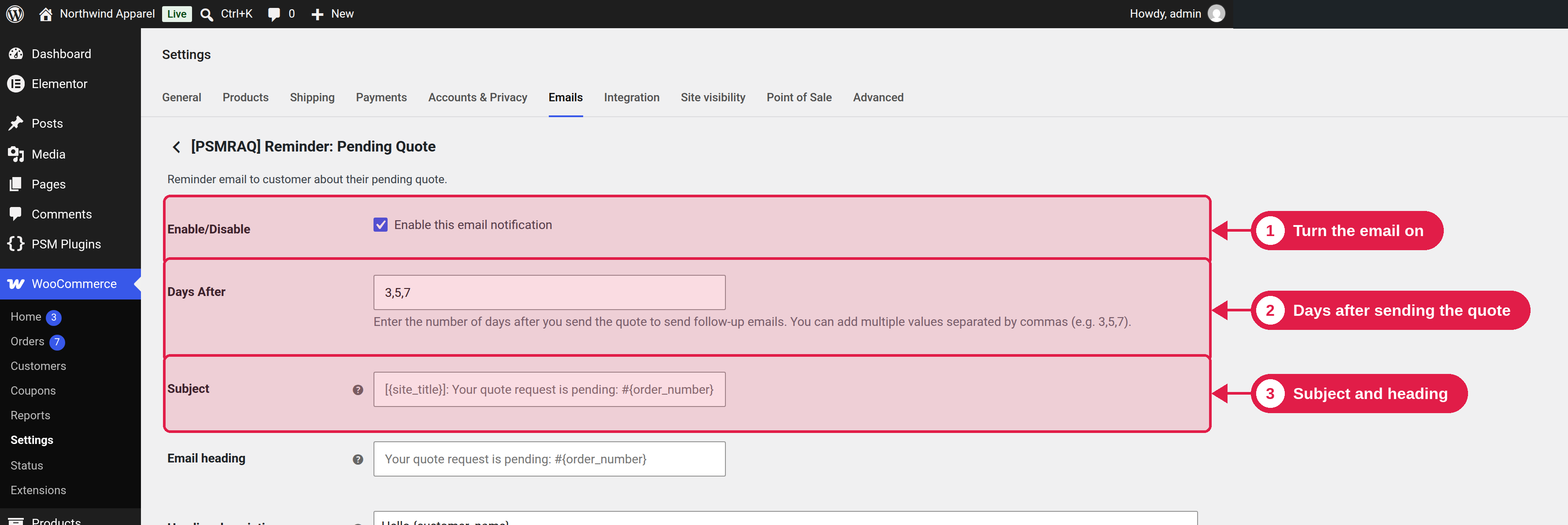
Pending quote reminder
Open [PSMRAQ] Reminder: Pending Quote.
- Days After: how many days after you send the quote to send a reminder. You can enter more than one number, separated by commas. The default is
3,5,7, which sends reminders 3, 5 and 7 days after the quote. - A reminder is not sent if it would be after the expiry date of the quote.
- No reminder is sent after the customer accepts or rejects, or after the quote expires.
Expiring quote reminder
Open [PSMRAQ] Reminder: Expiring Quote.
- Days Before: how many days before the expiry date to send a reminder. Use commas for more than one. The default is
3,1, which sends reminders 3 days and 1 day before the quote expires. - A reminder is only scheduled if its time is still in the future.
Other settings
Both emails have the same settings as the other customer emails: Enable/Disable, Subject, Email heading, Heading description, Customer details and Email type. See Customer emails.
Reminders use WordPress scheduled tasks
They are sent with WP-Cron, so on a very quiet site they may be a little late. Reminders are planned when you send the quote, and when you change its expiry date.