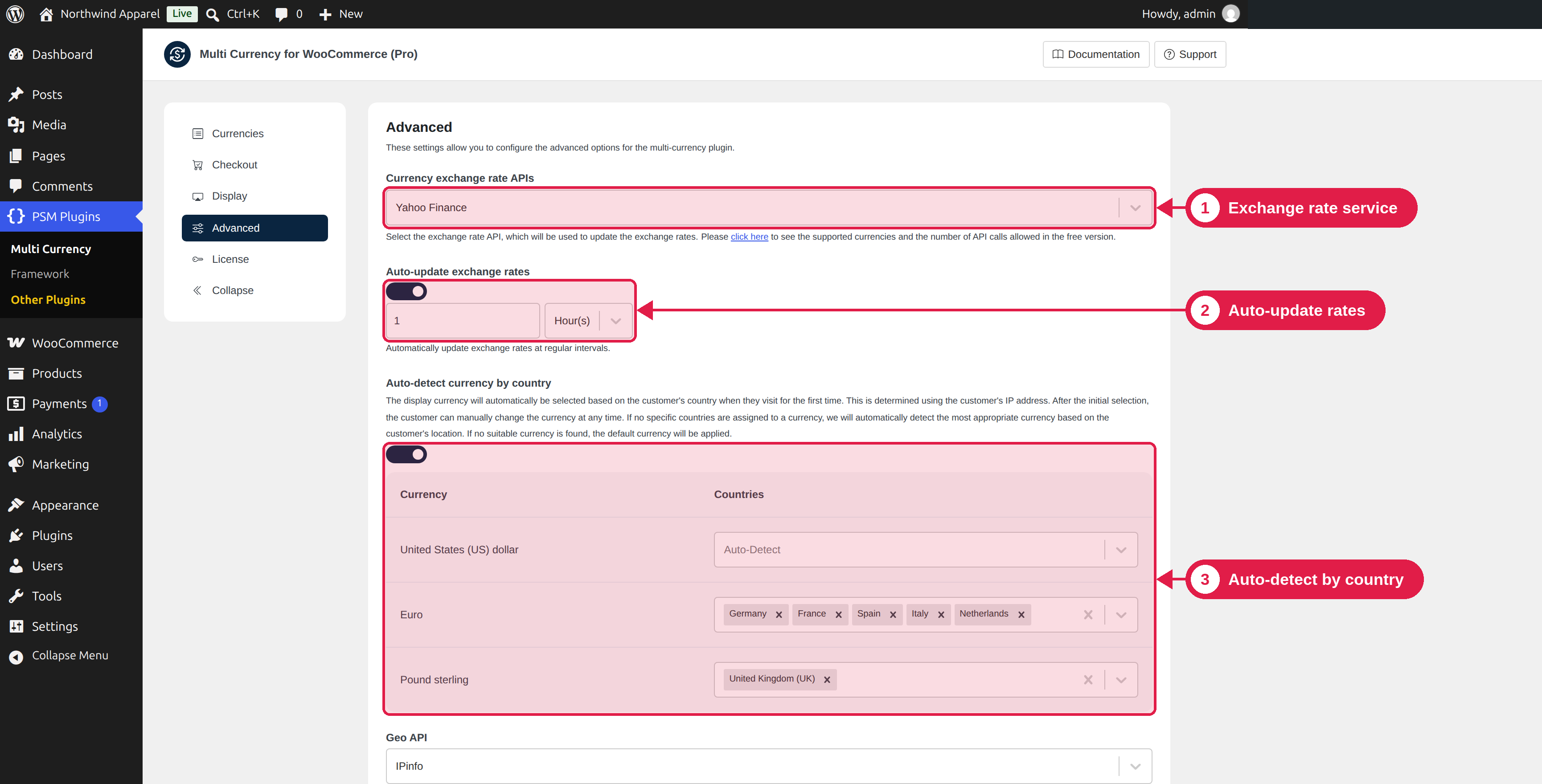
The Advanced tab has settings for exchange rate services, automatic updates, automatic currency by country and caching.
Plugin Free and Pro
Where PSM Plugins → Multi Currency → Advanced
Settings
Setting
What it does
Plugin
Currency exchange rate APIs
The service used to get exchange rates. See Exchange rates.
Free: Yahoo Finance. Pro: more services.
API Key
The key for services that need one. It appears only when you choose such a service.
Pro
Auto-detect currency by country
Shows a currency from the visitor's country. See Auto-detect currency by country.
Pro
Geo API
The service used to find the visitor's country. It appears when auto-detect is on.
Pro
In the free plugin, the Pro settings are shown with (Pro) in their name, and they are locked.
Save or reset
Click Submit to save. Click Reset to go back to the defaults:
- Exchange rate service: Yahoo Finance, with no API key.
- Auto-update exchange rates: off (the schedule is also removed).
- Auto-detect currency by country: off, and the countries you chose for each currency are cleared.
- Geo API: IPinfo.
- Use cache plugin: off.
Reset also clears your country choices
If you chose countries for your currencies, Reset removes them. Write them down first if you need them.