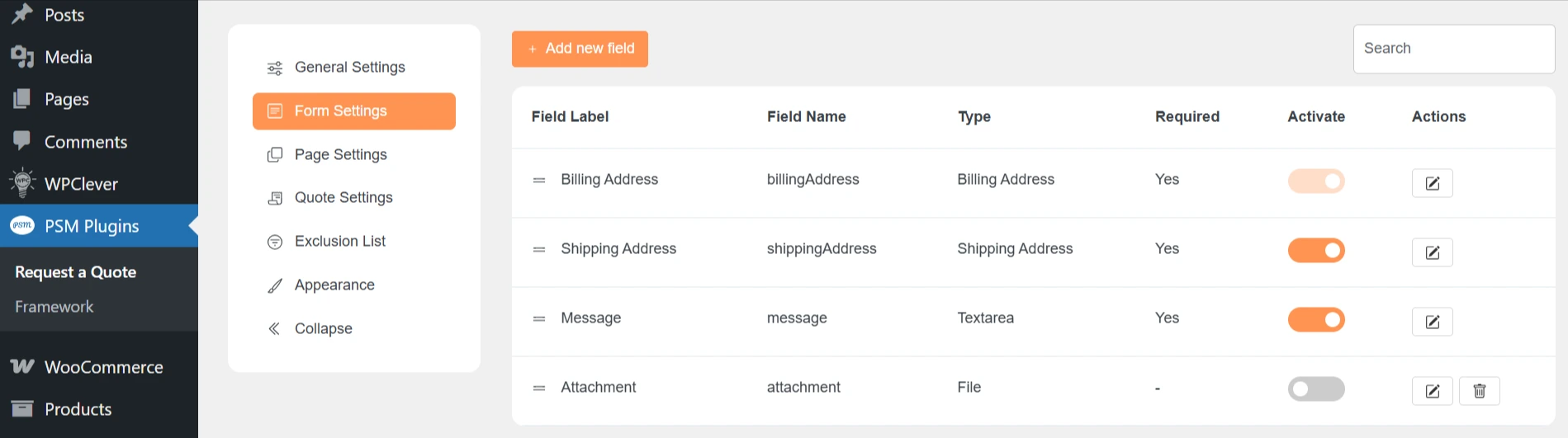
PSM Request a Quote comes with default form fields and additional field types.
You can enable, disable, or customize these fields from Request a Quote → Form Settings.
Default Form Fields
These fields are available by default and cover basic customer information.
-
Billing Address
Collects the customer’s billing details. -
Shipping Address
Collects the shipping address, if different from billing. -
Message
Allows customers to add notes or special requirements. -
Attachment
Lets customers upload files (for example, specifications or reference documents).
Additional Available Form Fields
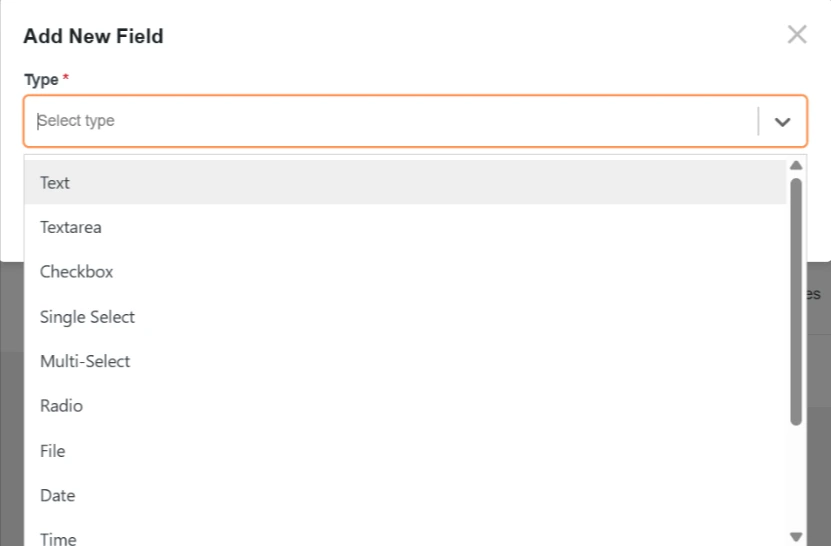
You can add more fields by clicking Add New Field.
Text-based Fields
-
Text – Single-line input for short text.
-
Textarea – Multi-line input for longer messages.
Selection Fields
-
Checkbox – Allows selecting one or more options.
-
Single Select – Dropdown with one selectable option.
-
Multi-Select – Dropdown with multiple selectable options.
-
Radio – Choose one option from a list.
File & Date Fields
-
File – Upload a file.
-
Date – Select a date.
-
Time – Select a time.
Consent & Layout Fields
-
Acceptance – Checkbox for terms and conditions.
-
Heading – Adds a heading inside the form.
-
Divider – Adds a visual separator between fields.
Notes
-
You can activate or deactivate any field.
-
Fields can be marked as required if needed.
-
Use layout fields like Heading and Divider to improve form clarity.