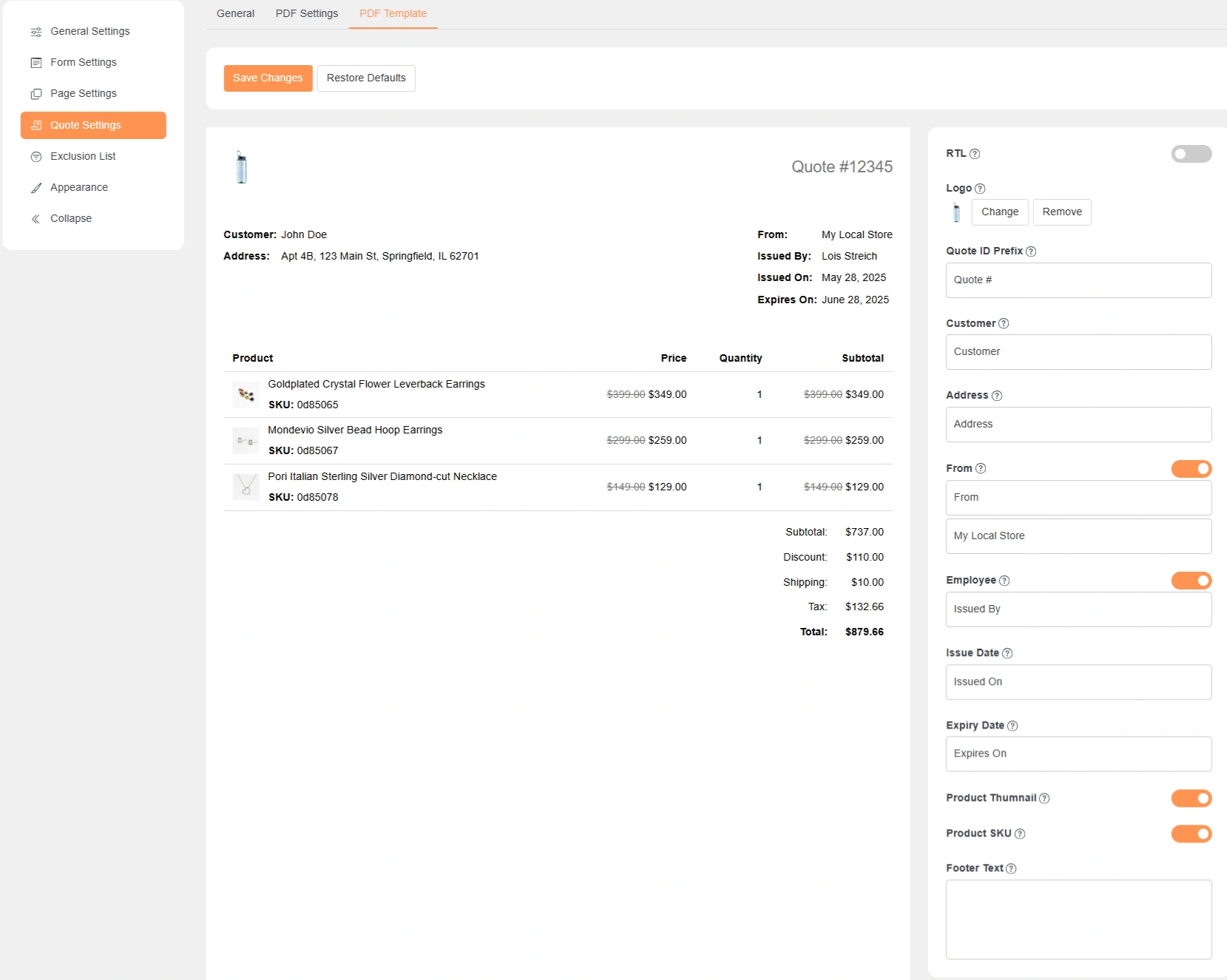
Quote Settings – PDF Template
These settings control how the quote PDF looks.
You can preview changes in real time on the left.
RTL (Right to Left)
Enable this for RTL languages like Arabic or Hebrew.
The PDF layout switches to right-to-left direction.
Logo
Upload your store logo for the PDF.
The logo appears at the top of the quote.
You can change or remove it anytime.
Quote ID Prefix
Adds text before the quote number.
Example: Quote #12345
Useful for branding or internal reference.
Customer
Controls the label shown for customer details.
You can rename it if needed.
Address
Controls the address label in the PDF.
Used to show the customer’s address.
From
Shows the sender or store name.
Usually your business or website name.
Employee
Shows the staff member who issued the quote.
Useful for internal or B2B communication.
Issue Date
Displays the date when the quote was created.
Helps customers track quote validity.
Expiry Date
Shows the quote expiration date.
Customers know until when the quote is valid.
Product Thumbnail
Shows product images in the quote PDF.
Disable it for a cleaner or text-only layout.
Product SKU
Displays the product SKU in the list.
Helpful for inventory or bulk orders.
Footer Text
Add custom text at the bottom of the PDF.
Use it for notes, terms, or contact details.