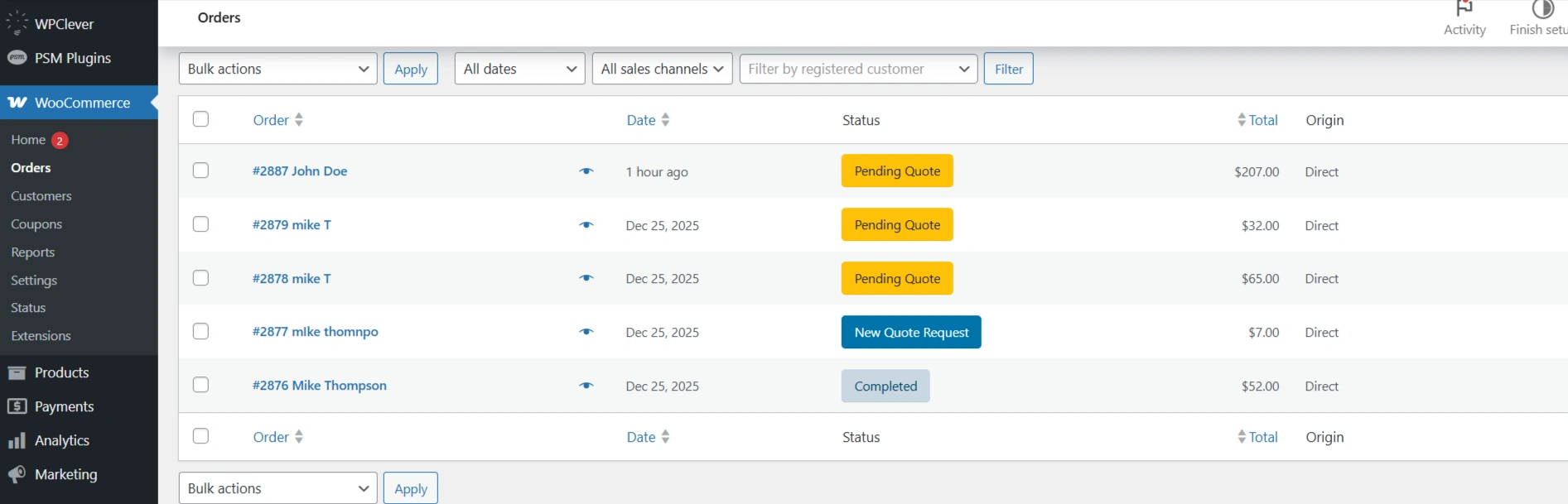
You can view and manage all quote requests directly from the WooCommerce Orders screen.
Quote requests appear alongside regular WooCommerce orders but are clearly identified by their quote-specific statuses.
Accessing Quote Requests
Navigate to WooCommerce → Orders in your WordPress dashboard.
All quote-related orders are listed here with their respective quote statuses.
Identifying Quote Statuses
Each quote request is labeled with a distinct status to help you quickly understand its current stage.
-
New Quote Request – A newly submitted quote request from a customer.
-
Pending Quote – A quote that is under review or awaiting further action.
-
Completed – A quote that has been accepted and converted into an order.
-
Rejected – A quote that has been declined by the customer or the store admin.
Viewing Quote Details
Click on the order number to open the quote.
Inside the order view, you can see customer details, requested products, pricing, and the current quote status.
Managing Quotes from the Orders List
From the Orders table, you can select one or more quote requests and use Bulk actions to manage them.
This makes it easier to handle multiple quotes efficiently.