
With this Pro feature, the checkout currency is chosen from the customer’s billing or shipping country. It is useful when you must charge a country in a specific currency, for example for local rules or payment gateways.
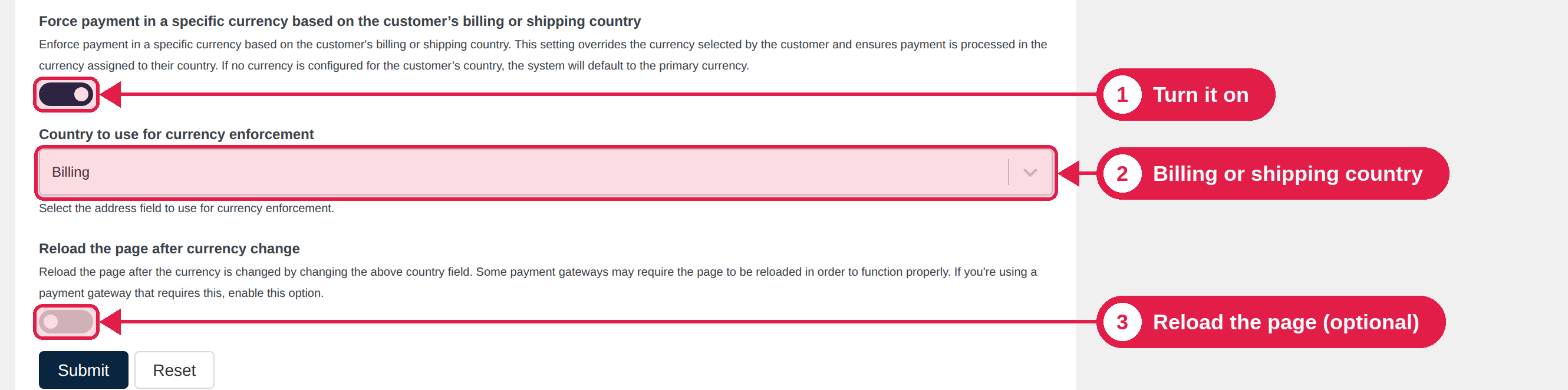
Turn it on
- Go to PSM Plugins → Multi Currency → Checkout.
- Make sure Enable different currency for checkout is on.
- Turn on Force payment in a specific currency based on the customer’s billing or shipping country.
- Under Country to use for currency enforcement, choose Billing or Shipping.
- Click Submit.
How the currency is chosen
When the customer enters or changes their country on the checkout page, the plugin finds the currency for that country in this order:
- If you assigned the country to a currency in Advanced → Auto-detect currency by country, that currency is used. See Auto-detect currency by country.
- If not, the plugin uses its built-in list of countries and their currencies. For example, Germany uses EUR.
- If that currency is not added, or is turned off for checkout, your store currency is used.
The checkout updates by itself when the customer changes the country.
Add the currency in the Currencies tab and keep its Status switch on in the Checkout tab. Otherwise the customer pays in your store currency.
Reload the page after currency change
Turn on Reload the page after currency change if some parts of your checkout page do not update their prices when the currency changes. The page then reloads once after the currency changes.
Show a notice
When a customer’s chosen currency is replaced, we suggest you show the currency notice, so they understand why. See Checkout Settings.