
This Pro feature chooses the currency for a new visitor from their country. A visitor from Germany can see euros the first time they open your shop, without using the switcher.
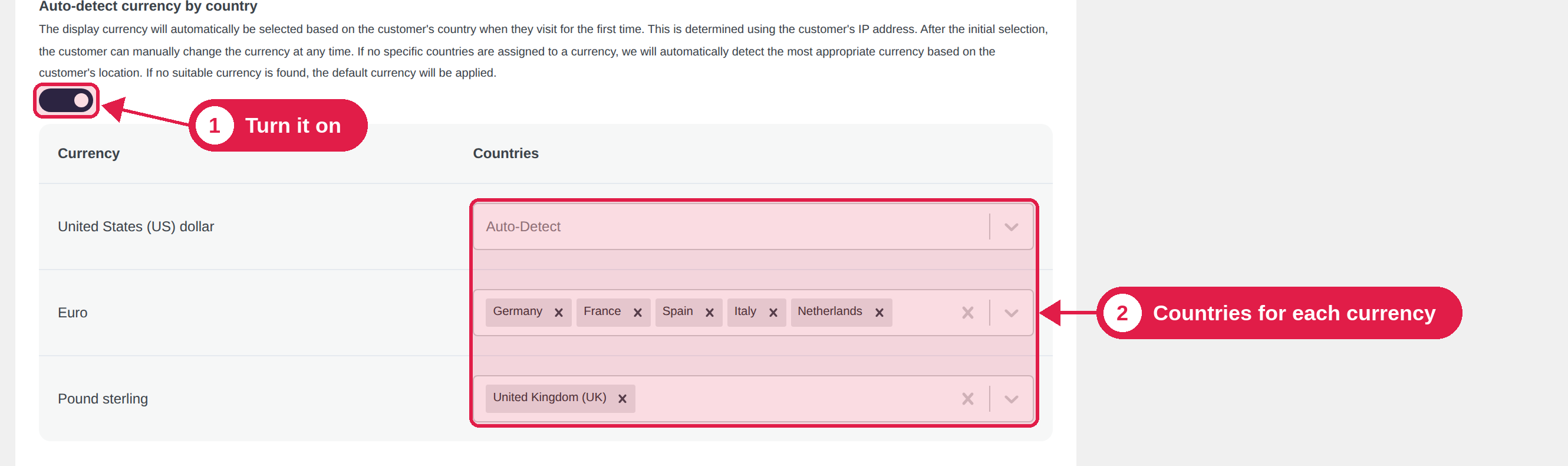
Turn it on
- Go to PSM Plugins → Multi Currency → Advanced.
- Turn on Auto-detect currency by country.
- Choose a service in the Geo API box.
- Click Submit.
How it works
- A new visitor opens your shop.
- The plugin finds the visitor’s country from their IP address, using the Geo API you chose. The country is remembered for one day for each IP address.
- It finds the currency for that country and shows prices in it.
- If there is no matching currency, your store currency is used.
Detection only works for visitors who have not chosen a currency yet. After a visitor uses the switcher, the plugin remembers their choice and does not change it.
The detected currency is used only if you added it in the Currencies tab and it is turned on. For example, to show euros to visitors from France, add EUR.
Choose the currency for each country
When you turn the feature on, a table appears with one row for each currency and a Countries box.
- Leave the box empty to use the plugin’s built-in list. For example, Germany uses EUR, and the United States uses USD.
- Choose countries to decide yourself. A country you choose for a currency always uses that currency. For example, choose Austria and Switzerland for EUR if you want them to see euros.
Geo API services
If one service gives wrong results or reaches its limit, try another one. Visitor IP addresses are sent to the service you choose. Please mention this in your privacy policy.